
Move around the circular wheel to raise or lower the source amount. Slow movement uses smaller steps; medium, fast, and flick movement cover progressively more value according to the currency’s unit profile. Tap for exact entry, double-tap or long-press to reset, and use VoiceOver adjustable actions when touch rotation is not the right interaction.
Velocity changes the step size
The wheel is designed for exploration rather than a fixed one-tick keypad. Its engine classifies angular movement as slow, medium, fast, or flick and changes the amount step accordingly. A deliberate motion helps approach a nearby value; a quick motion moves through a wider price range.
Step profiles account for currencies with two decimal places, zero decimals, three decimals, and high-unit values such as VND or IDR. The same gesture can therefore produce a different numeric step when the source currency changes.
Exact entry is part of the wheel workflow
You are not expected to land on every receipt amount by spinning. A single tap opens the exact-amount sheet, which is the fastest route for a precise menu price, ticket, or statement value.
Double-tap resets the amount, and long press also resets it. The allowed source range runs from zero to 999,999,999, with formatting appropriate to the selected currency.
Haptics and Pro controls change the feel
Classic wheel behavior and Classic haptics are available free. Pro adds Studio Pro, Neon Deck, and Minimal Glass wheel styles plus Crisp, Soft, and Minimal advanced haptic modes.
Pro also adds magnetic amount snapping near common values. Snapping helps with round-number exploration, but exact entry remains the reliable choice when you must match a printed amount exactly.
Accessibility has alternate paths
With VoiceOver, the wheel exposes an adjustable slider from zero to the maximum amount, allowing increment and decrement actions without tracing the circle. Exact entry provides another direct route.
Reduced Motion support limits wheel and badge animation. Haptics can be controlled in Settings, and the app supports system, light, and dark appearance choices.
Wheel movement and the Free allowance
Free includes 10 counted conversion signatures per local calendar day. The app does not count every intermediate wheel tick immediately; it waits for the wheel amount to remain stable for 1.25 seconds before entering the count path.
An immediate duplicate conversion signature does not consume another count. Changing the effective pair or settled amount can create a new signature, while Pro removes the counted-conversion limit.
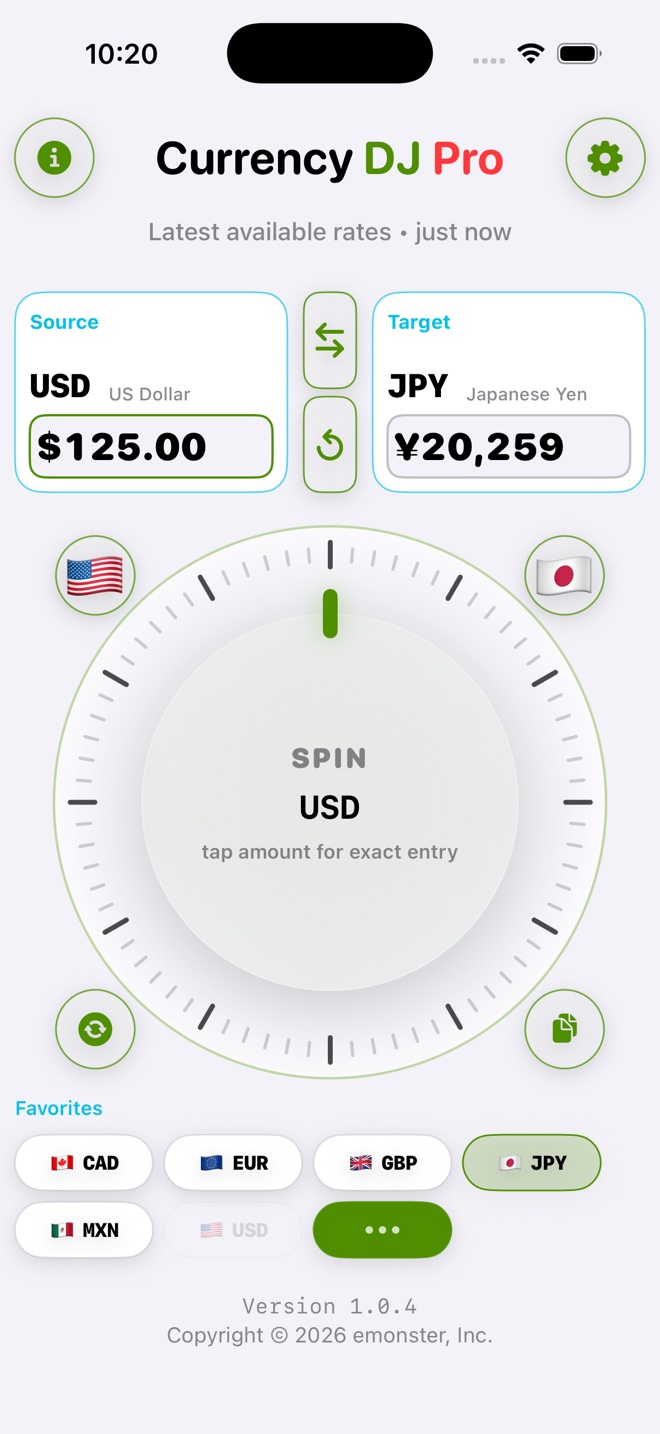
How to use Currency DJ
- Select the source currency first so the wheel uses the appropriate unit and step profile.
- Drag slowly around the wheel for nearby values and accelerate when you want to cross a larger range.
- Pause at the intended estimate; Free counting evaluates a stable wheel result after a 1.25-second debounce.
- Tap once to enter an exact amount when the printed value is difficult to reach with the wheel.
- Double-tap or long-press to reset, and use swap when you need the opposite currency direction.
- In Settings, choose available haptics, appearance, and—when Pro is active—wheel style, advanced haptic mode, and magnetic snapping.
Limits to keep in view
- Currency DJ results are estimates based on the latest available or a cached reference rate. They are not bank, card, ATM, checkout, exchange-counter, or tradable forex quotes.
- The wheel changes the entered amount; it does not make the underlying provider record newer or more precise.
- The maximum source amount is 999,999,999.
- Classic wheel and haptics are free; premium wheel styles, advanced haptics, and magnetic snapping require Pro.
- Free has 10 counted conversion signatures per local calendar day, even though intermediate wheel ticks are debounced.
Troubleshooting
The amount changes in steps that feel too large.
Slow the gesture, confirm that the intended source currency is selected, or tap for exact entry. Step profiles intentionally vary by currency and movement speed.
The wheel does not produce haptic feedback.
Check the app’s haptics preference and the iPhone’s relevant system settings. Reduced feedback can also reflect the chosen haptic mode.
Magnetic values or a wheel style cannot be selected.
Magnetic snapping and the Studio Pro, Neon Deck, and Minimal Glass styles require an active Currency DJ Pro entitlement.
VoiceOver makes circular dragging difficult.
Use the wheel’s adjustable increment and decrement actions or open exact entry instead of tracing the circle.
Frequently asked questions
Why does the Currency DJ wheel speed matter?
The engine uses slow, medium, fast, and flick movement classes to select different step sizes, making it possible to explore both nearby and distant values.
Can I type an exact amount?
Yes. Tap the wheel once to open exact amount entry; the wheel is not the only input method.
Does every wheel tick use one Free conversion?
No. Wheel changes enter the count path only after the amount remains stable for 1.25 seconds, and an immediate duplicate signature does not consume another count.
Is the scrub wheel accessible with VoiceOver?
Yes. It exposes adjustable slider behavior from zero to 999,999,999, and exact entry offers a second accessible input path.
Sources and further reading
- Currency DJ: FX Converter on the App Store — Apple’s current product listing for Currency DJ.
- Frankfurter exchange-rate API — Documentation for the reference-rate provider used by Currency DJ.
Make the next conversion tactile
Spin through a price range, feel the steps, then tap straight into an exact amount when the estimate becomes a decision.
Get Currency DJ on the App Store