Use iPhone Calculator when you need an occasional one-off calculation and already have a rate you trust. A dedicated converter such as Currency DJ is more convenient for repeated travel checks because it keeps the currency pair visible, offers a tactile wheel and exact entry, remembers useful currencies, and can reuse downloaded reference rates when a connection disappears.
The two tools solve different parts of the problem
A general calculator is excellent at arithmetic. If you know the exchange rate, you can multiply or divide an amount and keep complete control over the formula. That is often enough for a single planned purchase or for checking a statement with a rate supplied by your bank.
A currency converter also manages the surrounding context: source and target codes, rate retrieval, rate age, formatting, swapping direction, and repeated amounts. Currency DJ performs the amount arithmetic locally with Decimal values after it has a provider snapshot; the rate request contains currency codes rather than the amount you entered.
When a dedicated converter is faster
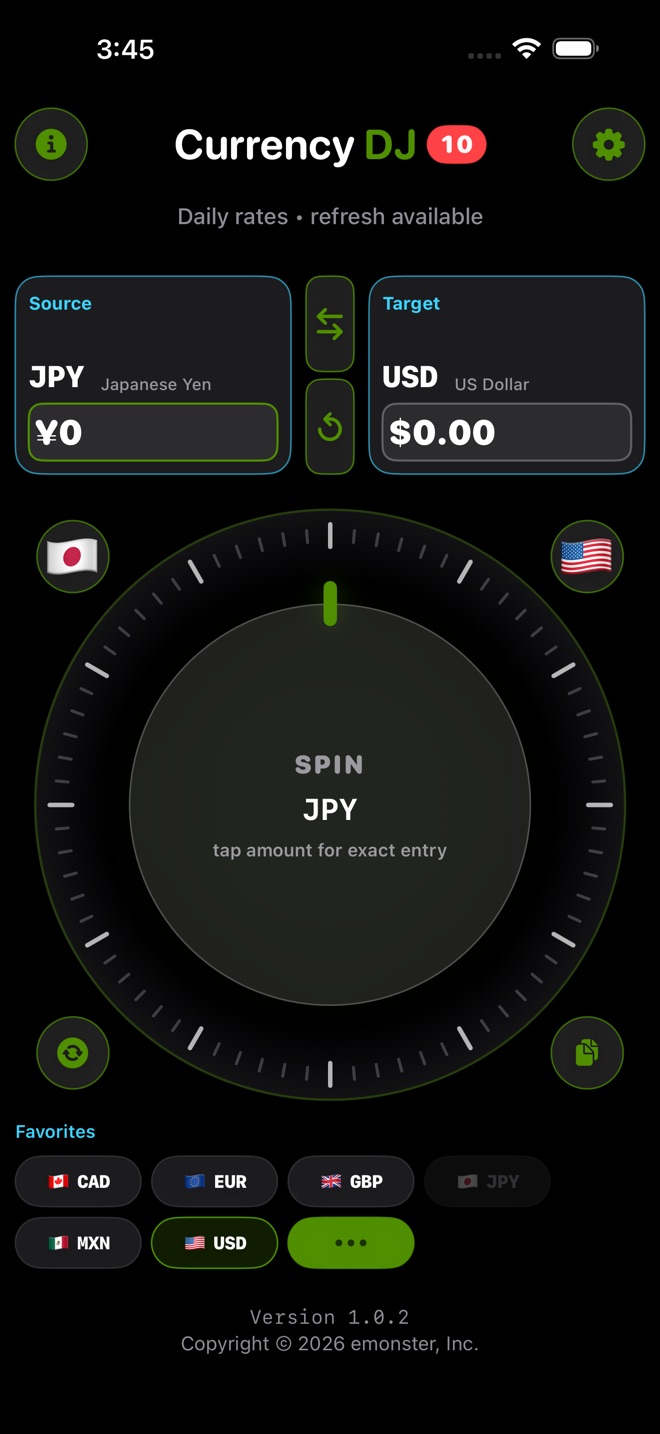
A dedicated interface becomes useful when you are checking many prices in the same pair. In Currency DJ, the pair stays on screen while the scrub wheel moves through nearby amounts. You can tap the wheel for exact entry, swap the direction, copy a result, or choose a favorite target without rebuilding a formula each time.
The app exposes 160 selectable currency codes and formats amounts using currency-specific minor units. That local list does not guarantee that the provider has a current record for every possible pair, so an unavailable pair should be treated as a coverage limitation rather than an arithmetic error.
When Calculator is enough
Stay with Calculator when you already have the exact rate or final total that matters, when you need to model a known fee, or when the conversion is a one-time task. A transparent formula can be preferable to any app-provided reference estimate when you are reconciling a card statement or testing a merchant’s quoted rate.
Neither approach can predict a final charge without the issuer’s or merchant’s terms. A card network, bank, ATM, exchange counter, or dynamic-currency-conversion provider may use a different timestamp, spread, fee, or rounding rule.
A useful decision rule
Choose the tool that removes the repetitive part of your task. For one formula, use Calculator. For a stream of menus, fares, tickets, or shelf prices, keep the pair open in Currency DJ and move between approximate and exact entry as needed.
In either case, label the result correctly in your own decision: it is a planning estimate until a provider responsible for the transaction shows the actual amount and fees.
How to use Currency DJ
- Open Currency DJ and set your spending currency as the source and your home currency as the target.
- Use the wheel to scan nearby prices quickly, or tap the wheel to enter an exact amount.
- Check the displayed rate status before using the result, especially if you may be offline.
- Swap the pair when you need to work in the opposite direction, such as turning a home-currency budget into a local spending limit.
- For a final transaction, compare the estimate with the merchant, bank, card, ATM, or exchange-counter total and its disclosed fees.
Limits to keep in view
- Currency DJ results are estimates based on the latest available or a cached reference rate. They are not bank, card, ATM, checkout, exchange-counter, or tradable forex quotes.
- Currency DJ is an iPhone app that requires iOS 18.0 or later; it is not a desktop or Android calculator.
- The 160 codes are locally selectable currencies, not a promise that the rate provider has a current record for every pair.
- Free use includes 10 counted conversion signatures per local calendar day; an immediate duplicate signature does not consume another count.
Troubleshooting
A currency appears in the picker but the conversion is unavailable.
Try a refresh while connected. If the provider still returns no usable record, use a trusted published rate in Calculator or choose another supported pair; local selection does not prove provider coverage.
The wheel is awkward for a precise price.
Tap the wheel to open exact amount entry instead of trying to land on the value by touch.
The estimate differs from a posted or charged amount.
Compare timestamps, currency direction, issuer or merchant fees, spreads, and rounding. The transactional provider’s disclosed total is authoritative for that purchase.
Frequently asked questions
Does iPhone Calculator make a dedicated currency converter unnecessary?
No single tool is always best. Calculator is sufficient for a known rate and one-off arithmetic; Currency DJ reduces setup for repeated pair-based checks and can reuse previously downloaded rates.
Does Currency DJ send my entered amount to the rate provider?
No. The rate request uses currency codes, and the entered amount is multiplied locally. Exact conversion amounts and results are also intentionally omitted from app analytics events.
Can Currency DJ replace the exchange rate shown by my card?
No. Currency DJ provides a reference-rate estimate. The card issuer or network determines the actual conversion, timing, spread, and fees for a card transaction.
Can I use Currency DJ repeatedly without typing each amount?
Yes. Keep the pair visible and spin the scrub wheel through nearby values; tap for exact entry whenever the price is not convenient to reach by touch.
Sources and further reading
- Currency DJ: FX Converter on the App Store — Apple’s current product listing for Currency DJ.
- Frankfurter exchange-rate API — Documentation for the reference-rate provider used by Currency DJ.
Make the next conversion tactile
Keep a travel currency pair on screen and move from a quick wheel estimate to exact entry without rebuilding a formula.
Get Currency DJ on the App Store